Minecraft weapon maker
Go beyond basic damage stats. Wire swords, bows, crossbows, wands, and hammers to hit triggers, raycasts, cooldowns, and area mining.
- Java Edition 1.20.1 to 26.3
- NeoForge
- Fabric
- Bedrock add-ons
Live graph: The Frost Sword crafted from ice and sticks, wired to apply Slowness whenever a player hits with it held.
What you can configure

On-hit and projectile triggers
Use When player hits and When projectile hits block to inflict status effects, ignite targets, modify damage, or attribute bonus damage kills.

Right-click wands and cooldowns
Set hotbar cooldown ticks on any Item node, raycast with Looked-at block, launch projectiles, strike lightning, or teleport cleanly.

3x3 hammers and vein miners
Combine When block is broken with Break block in 3x3, 5x5, or Connected modes while respecting tool tiers and bedrock.

Custom enchantments
Create new enchantments for weapons, tools, or armor with configurable max levels, enchanting table availability, and bonus effects.
Inside combat event and action nodes
Weapons in makemods.app combine an Item node (for stats, durability, and cooldown) with Event, Condition, and Action nodes. Selecting When player hits, When item is used, or Break block lets you filter melee vs projectile hits, choose target blocks or mobs, and tune area mining or status durations.
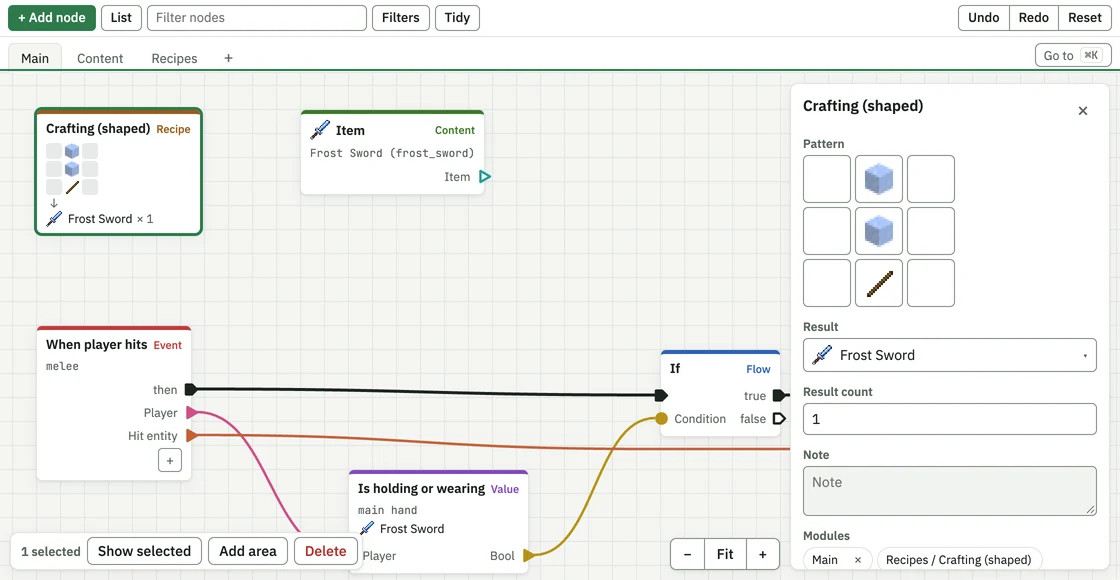
In When player hits, filter by Melee, any Projectile, or specific projectiles (Arrow, Snowball, Fireball, WindCharge) and optional target mob lists.
Set Cooldown on an Item node (e.g., 40 ticks for 2 seconds) to render Minecraft's native hotbar cooldown sweep automatically.
Break block supports Single, 3x3, 5x5, or Connected (with Up to 256 blocks) for hammers, excavators, and tree-felling axes.
Use Change damage to scale or add flat hit damage before impact, or Damage to deal attributed bonus damage that preserves kill credit and loot drops.
Example builds you can make
Example 1: Frost Sword with crafting recipe and Slowness on hit
Give a custom sword elemental combat utility by checking what the player is holding during When player hits.
- Item node (frost_sword) + Shaped recipe: Sword crafted from two Ice blocks and one Stick.
- When player hits -> Is holding or wearing -> If: Checks that frost_sword is held before branching.
- Add effect action: Wired to If's true branch and When player hits's Hit entity output to inflict Slowness for 5 seconds.
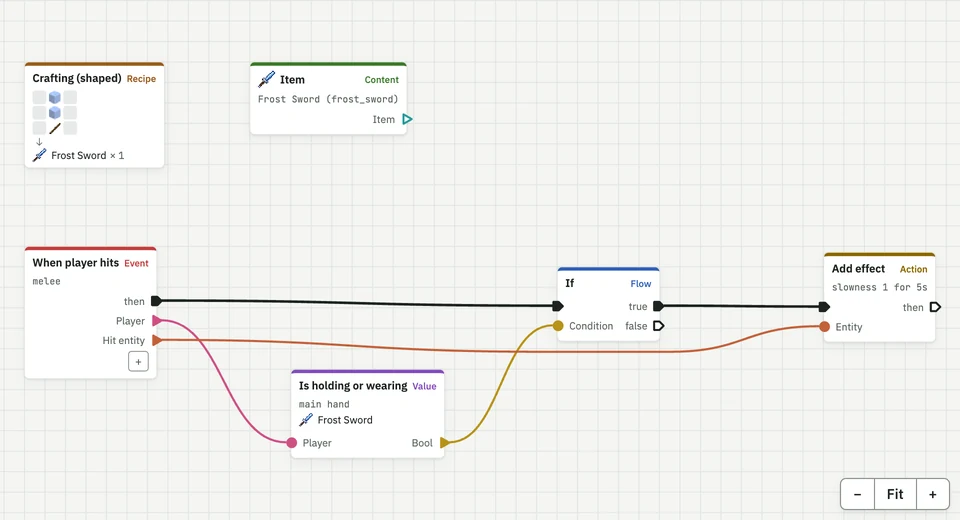
Swinging the Frost Sword in combat applies Slowness to struck mobs and players without affecting unarmed hits or other weapons.
Example 2: 3x3 Mining Hammer with pickaxe tag filter
Heavy mining tools clear a 3x3 plane oriented automatically to whichever block face the player mined, while respecting tool harvest rules.
- Item node (ruby_hammer): Pickaxe item with high durability.
- When block is broken event: Blocks filtered to #minecraft:mineable/pickaxe.
- Is holding -> If -> Break block: Area set to 3x3, Drop items enabled, wired with Block position and Breaker from the event.
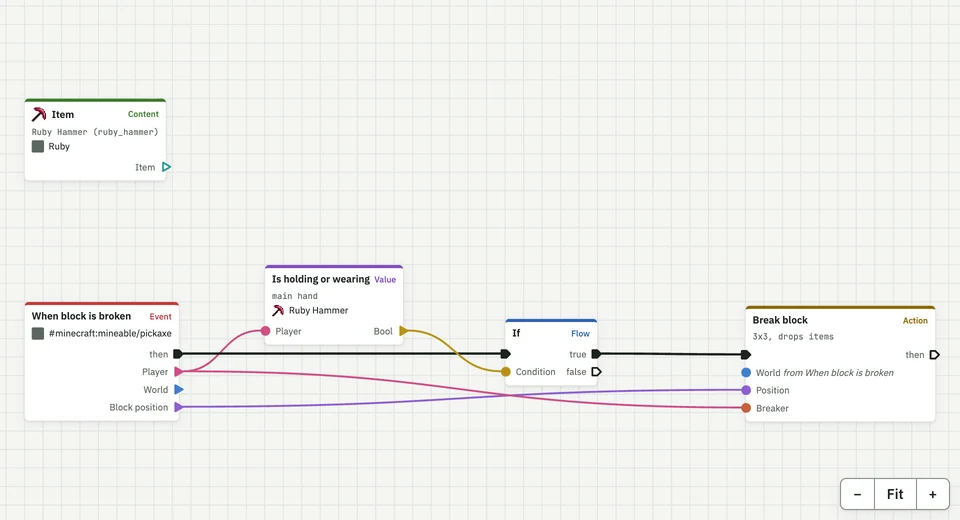
Mining stone or ore with the Ruby Hammer breaks a 3x3 wall or floor slice cleanly, skips bedrock automatically, and drops blocks properly.
Example 3: Teleport Staff with raycast and hotbar cooldown
Right-click abilities pair Looked-at block with Teleport so players blink safely beside walls instead of clipping inside solid stone.
- Item node (teleport_staff): Max stack 1, Cooldown set to 40 ticks (2 seconds).
- When item is used event: Targets set to teleport_staff.
- Looked-at block (Distance 24) -> Teleport: Wire the In front position output (not Block) into Teleport.
Right-clicking teleports the player up to 24 blocks into the empty air space right in front of the aimed surface and starts the 2-second hotbar cooldown.
Combat mechanics across targets
| Capability | Java Edition (NeoForge & Fabric) | Bedrock Edition (.mcaddon) |
|---|---|---|
| Cooldowns and hit attribution | Native Minecraft item cooldowns and player-attributed damage sources so loot and advancements trigger. | Script API cooldown tracking and entity damage helpers. |
| Area block breaking | Drops items only when the held tool harvests the block and skips unbreakable blocks. | Runs block-break area logic inside Script API afterEvents. |
| Custom Java extensions | Drop a Java code node inline when you need a custom particle math or hitbox routine. | Java code nodes are Java-only and flagged in Problems before export. |
Frequently asked questions
How do I prevent players from spamming a right-click wand every tick?
Set Cooldown (ticks) on your Item node (20 ticks equals 1 second). When item is used checks and starts that cooldown automatically, and the Problems pane warns you (MM502) if a reusable item has no cooldown or durability.
What is the difference between Damage and Change damage?
Change damage modifies the incoming hit itself (scaling or adding to it, only inside hit events before Wait). Damage deals a separate attributed attack from the same player or mob, which keeps kill credit, XP, and mob loot drops working.
Can I use cooldowns on abilities triggered by sneaking or keybinds?
Yes. Because When player sneaks and When key is pressed don't consume an item directly, check Is on cooldown in an If node first, run your ability on the false branch, and call Start cooldown afterward.
How do custom Enchantment nodes work on weapons?
Add an Enchantment node with Goes on set to Weapons, Bows, or Crossbows, pick Max level and Rarity, and add Enchant effects such as ExtraDamage, Knockback, or SetOnFire, or read Enchantment level inside your own hit flow.
Related docs and guides
- Docs: Hits and damageCancel hits, scale damage, and react to player kills.
- Docs: Right-clicksDistinguish item use, block clicks, and entity clicks.
- Docs: PositionsRaycast aimed blocks and break 3x3 or connected veins.
- Guide: Designing Custom Minecraft WeaponsFull walkthrough of the Frost Sword, Teleport Staff, and 3x3 Hammer.
- Guide: Why an AI Mod Maker Works Better as a GraphTweak cooldowns and effects directly without re-prompting.
More mod maker features
- Items, tools & armorCreate custom Minecraft items, pickaxes, armor sets, storage pouches, and enchanted food in your browser with visual nodes and AI.
- Blocks, ores & cropsCreate custom Minecraft blocks, underground ores, block families, crops, and light-emitting decor visually in your browser.
- Custom mobsDesign custom Minecraft mobs, hostile bosses, tameable companions, AI behaviors, loot drops, and biome spawns without coding.
- Recipes & lootBuild Minecraft shaped and shapeless crafting recipes, blast furnace smelting, smithing upgrades, villager trades, and loot tables visually.