Minecraft block maker
Build custom blocks, stairs, slabs, doors, crops, saplings, and underground ore generation with Fortune and Silk Touch drops.
- Java Edition 1.20.1 to 26.3
- NeoForge
- Fabric
- Bedrock add-ons
Live graph: Ruby Ore generating underground and dropping Rubies, plus a glowing Ruby Block crafted from nine Rubies.
What you can configure

17 block shapes and families
Build cubes, columns, stairs, slabs, walls, fences, gates, doors, trapdoors, buttons, pressure plates, panes, crops, leaves, saplings, and carpets.

Underground ore veins
Control vein size, veins per chunk, min and max Y elevation, host blocks (stone, deepslate, netherrack, end stone), and target biomes.

Mining tools, XP, and loot
Set hardness, required pickaxe or axe tier, Silk Touch and Fortune behavior, XP drops, light emission, redstone power, and sand-like gravity.

Block events and fluids
Trigger graph logic on block break, placement, right-click, or step-on, and define custom flowing fluids with block reactions.
Inside the Block inspector
Every Block node adapts its inspector fields to the Shape you select. Choosing Cube reveals worldgen Ore settings, Redstone power, See-through transparency (for glass or grates), and gravity behavior, while Crop reveals four growth-stage textures and grass seed drops, and Sapling reveals Trunk, Leaves, and wild world generation.
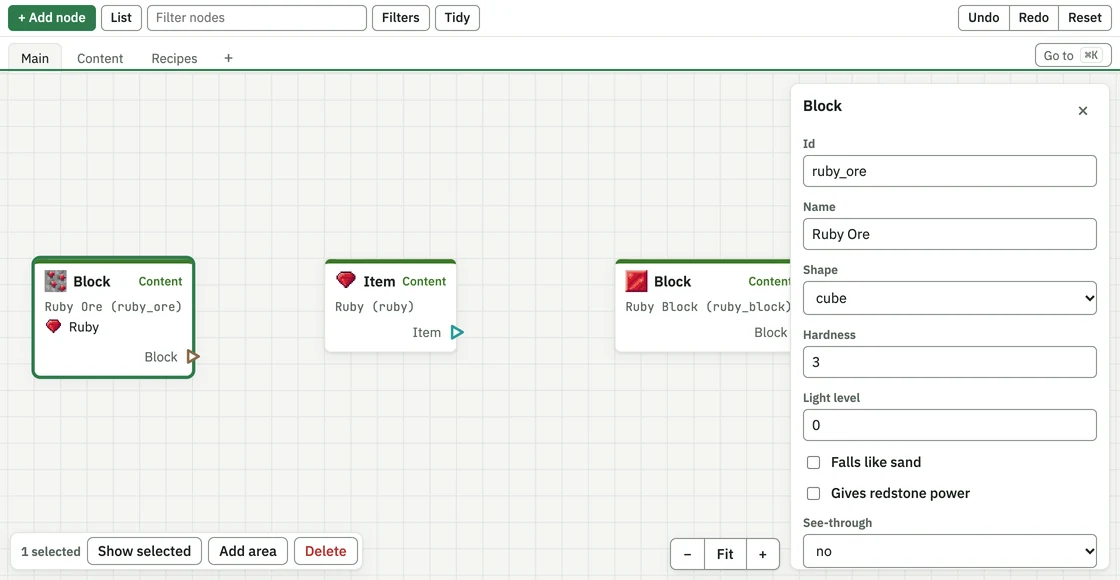
Select any of 17 Minecraft shapes from Cube and Column to Door, Trapdoor, Crop, or Sapling, and set Light level from 0 to 15.
Choose Mined with (Pickaxe, Axe, Shovel, Hoe), Tool tier (Any through Diamond), Needs correct tool, Silk Touch, Fortune, XP min/max, and up to 8 drop rows.
Toggle Generates in the world to configure Vein size (1 to 64), Veins per chunk, Lowest Y and Highest Y (-64 to 320), host rock, and biome tags.
Link a base block to its stairs, slab, wall, fence, and button in a Block family node to auto-generate crafting and stonecutter recipes.
Example builds you can make
Example 1: Underground Ruby Ore and glowing Ruby Block
Create a natural underground ore that spawns between deepslate and lower stone layers, requires at least an Iron Pickaxe, drops 1 to 2 Rubies with Fortune support, and crafts into a glowing storage block.
- Block node (ruby_ore): Shape Cube, Needs correct tool checked, Mined with Pickaxe, Tool tier Iron, Silk Touch and Fortune enabled, Generates in the world enabled with Vein size 8, Veins per chunk 6, Y -64 to 32, Replaces Stone and Deepslate.
- Drops table on ruby_ore: Drops 1 to 2 Ruby items at 100% chance, plus 1 to 3 XP orbs.
- Block node (ruby_block) + Shaped recipe: Light level 4 glowing block crafted from a 3x3 grid of Rubies.
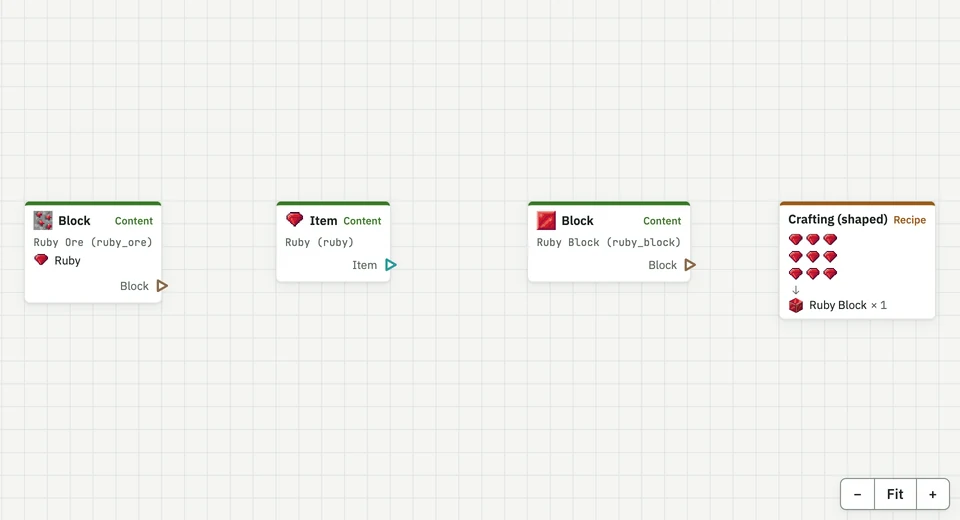
Exploring caves in new chunks spawns Ruby Ore veins naturally, mining with Iron+ tools drops Rubies scaled by Fortune, and crafting nine Rubies produces a light-emitting block.
Example 2: Harvestable Frostberry Crop and Ruby Block Family
Combine farming progression and architectural building blocks in one mod using Crop shape settings and a Block family node.
- Item node (frostberry): Basic edible fruit restoring 3 hunger points.
- Block node (frostberry_crop): Shape set to Crop, Drops from grass enabled so breaking tall grass drops Frostberry seeds, and Drops set to 1 to 3 Frostberries when mature.
- Block family node: Connects Ruby Block as the base block to Ruby Stairs and Ruby Slab with Stonecutter recipes enabled.
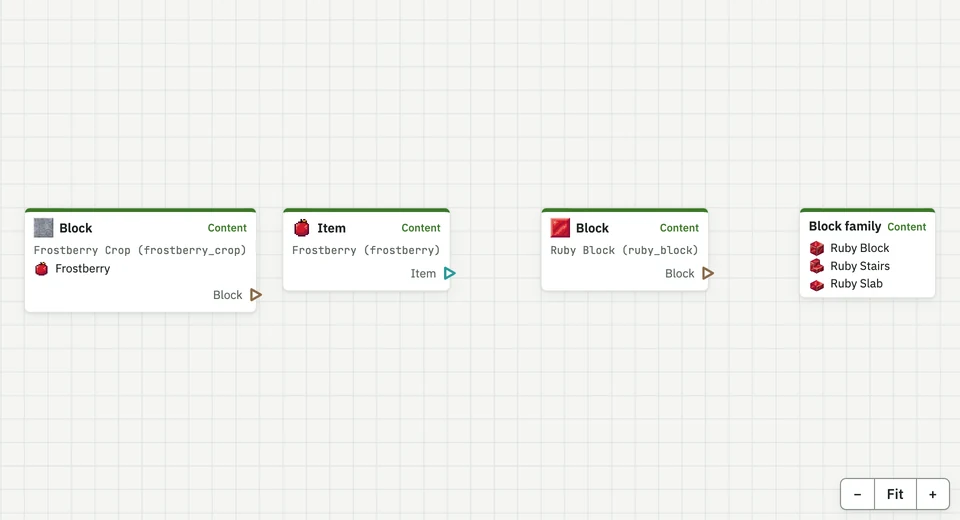
Players discover Frostberry seeds from wild grass, grow crops through all stages on farmland, and cut Ruby Blocks into stairs and slabs on a Stonecutter or crafting table.
Example 3: Interactive Speed Pad using step-on events
Blocks can trigger gameplay behavior whenever players walk over them or right-click them, without any redstone wiring.
- Block node (booster_tile): Shape PressurePlate or Cube with a bright custom texture.
- When player steps on event node: Targets set to booster_tile.
- Add effect action node: Applies Speed level 2 for 3 seconds to the stepping player.
Running across a path of Booster Tiles automatically refreshes a Speed II boost, making custom parkour courses and Nether highways quick to build.
Java Edition vs Bedrock add-ons for blocks
| Capability | Java Edition (NeoForge & Fabric) | Bedrock Edition (.mcaddon) |
|---|---|---|
| Ore generation and drops | Generates configured/placed worldgen JSON, loot tables, and mineable tags for NeoForge and Fabric. | Outputs Bedrock feature rules and block permutation JSON. |
| Block shapes and families | All 17 shapes plus Block family stonecutter and crafting recipes. | Builds custom blocks as full cubes; Problems warns automatically before you export. |
| Block interaction events | Native loader hooks for break, place, right-click, and entity step. | Translated into @minecraft/server block event handlers. |
Frequently asked questions
How do I control where a custom ore generates underground?
Enable Generates in the world on any Cube Block node. You can set Lowest Y and Highest Y between -64 and 320, Vein size, Veins per chunk, whether it replaces Stone, Deepslate, Netherrack, or End Stone, and filter by biome tags like #minecraft:is_overworld or #minecraft:is_nether.
Do Silk Touch and Fortune work automatically on custom ores?
Yes. Both Silk Touch drops the block and Fortune adds drops are checkboxes right on the Block node, generating proper Minecraft loot table conditions when you build.
How do custom trees work with Sapling and Leaves blocks?
Create a Leaves block and a Cube log block, then add a Block node with Shape set to Sapling. Point Trunk and Leaves to those blocks, choose a Trunk height (2 to 20), and optionally enable Grows in the world to spawn your trees naturally across chosen biomes.
Can I make custom transparent blocks like glass or glowing lanterns?
Yes. On a Cube Block node, set See-through to Holes (for leaves/grates) or Tinted (for translucent glass), and set Light level up to 15 (equivalent to Glowstone or Sea Lanterns).
Related docs and guides
- Docs: PositionsRead looked-at blocks, break 3x3 areas, and check redstone power.
- Docs: Right-clicksRun actions when a player right-clicks a custom block.
- Guide: NeoForge vs Fabric vs Bedrock Add-OnsHow block shapes and world generation map across platforms.
- Guide: How to Make a Minecraft ModStep-by-step guide to creating your first ore and block mod.
More mod maker features
- Items, tools & armorCreate custom Minecraft items, pickaxes, armor sets, storage pouches, and enchanted food in your browser with visual nodes and AI.
- Custom mobsDesign custom Minecraft mobs, hostile bosses, tameable companions, AI behaviors, loot drops, and biome spawns without coding.
- Weapons & combatBuild custom Minecraft weapons, elemental swords, teleport wands, bows, custom enchantments, and 3x3 hammers on a visual node graph.
- Recipes & lootBuild Minecraft shaped and shapeless crafting recipes, blast furnace smelting, smithing upgrades, villager trades, and loot tables visually.