Minecraft item maker
Design custom items, tool sets, armor materials, bows, and food with status effects on a live node graph, then build for Java or Bedrock.
- Java Edition 1.20.1 to 26.3
- NeoForge
- Fabric
- Bedrock add-ons
Live graph: Ruby tool material, Ruby Pickaxe, and an edible Ruby Apple with Regeneration. Drag any node or switch to the Ruby example.
What you can configure

Tool and armor materials
Set mining level (Wooden through Netherite), durability, mining speed, attack damage bonus, enchantability, armor slots, toughness, and repair items.

Food, drinks, and potions
Configure nutrition, saturation, eating duration, leftover return items, and up to eight timed potion effects with trigger chances, plus brewed potions.

Cooldowns, tags, and storage
Add hotbar cooldown ticks, furnace burn time, compost chance, item tags, or portable item storage rows directly on the Item node.

Pixel art texture studio
Start from built-in templates and starter packs, paint pixel-by-pixel in the icon designer, upload PNGs, or ask the AI to draw item textures.
Inside the Item and Tool Material inspector
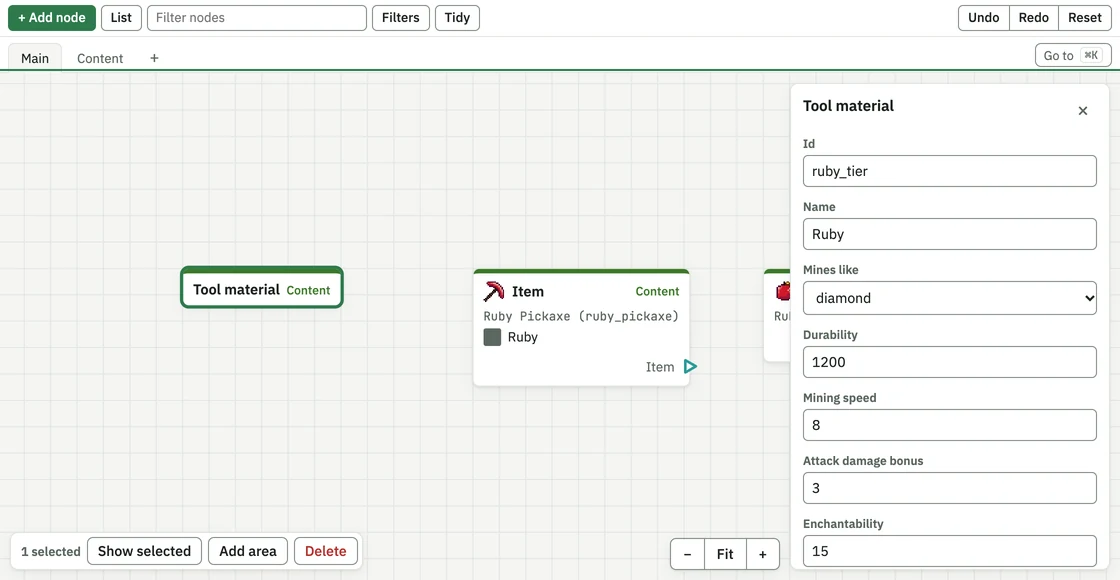
Selecting any Item, Tool material, Armor material, or Potion node opens its inspector on the right side of the canvas. Fields adapt dynamically to the item type you pick: choosing Pickaxe reveals the Material reference, while enabling Food reveals Nutrition, Saturation, Drink, Eat time, Effects, and Leftover container slots.
Pick Basic, Sword, Pickaxe, Axe, Shovel, Hoe, Helmet, Chestplate, Leggings, Boots, Bow, or Crossbow, then link a Tool or Armor material node.
Toggle Food to set Nutrition (0 to 20), Saturation (0.0 to 2.0), Always edible, Drink animation, Leftover item (such as a glass bottle or bowl), and up to 8 timed status effects.
Set hotbar cooldown ticks (20 ticks per second), item durability, max stack size up to 99, or Use up one for consumables triggered by When item is used.
Turn a Basic item into a portable pouch with 1 to 6 chest rows, set furnace Burn time in ticks, or set Compost chance % for farms.
Example builds you can make
Example 1: Ruby Pickaxe tier and edible Ruby Apple
Start by defining a reusable Tool material node so your entire tool set shares one durability, mining tier, and repair item. Pair it with a special food item that rewards mining with Regeneration.
- Tool material node (ruby_tier): Mines like Diamond, Durability 1200, Mining speed 8.0, Attack damage bonus 3.0, Enchantability 15.
- Item node (ruby_pickaxe): Type set to Pickaxe, linked to ruby_tier, with a custom 16x16 pixel texture.
- Item node (ruby_apple): Food enabled, Nutrition 6, Saturation 0.8, and an Effects row applying Regeneration level 1 for 8 seconds at 100% chance.
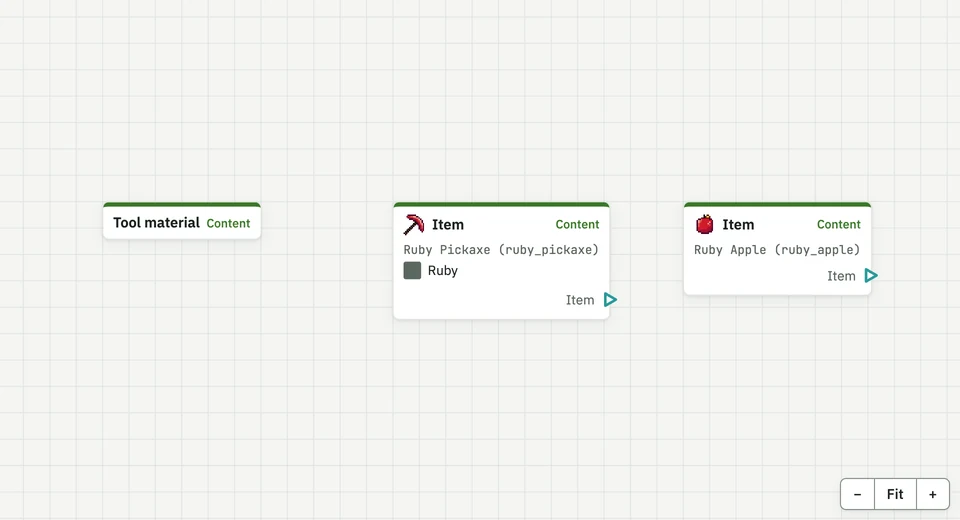
In game, the Ruby Pickaxe mines obsidian at faster-than-diamond speed, repairs with your custom gem, and the Ruby Apple triggers the Regeneration heart boost when eaten.
Example 2: Complete Ruby Armor set and brewed Ruby Elixir
Armor sets share one Armor material node across Helmet, Chestplate, Leggings, and Boots. You can pair the gear with a custom brewed potion made on a vanilla Brewing Stand.
- Armor material node (ruby_armor): Durability 25, Helmet 3, Chestplate 7, Leggings 6, Boots 3, Toughness 1.5, Diamond equip sound.
- Two Item nodes (ruby_helmet and ruby_chestplate): Type set to Helmet and Chestplate, both referencing ruby_armor.
- Potion node (ruby_elixir): Brewed from Awkward potion with Amethyst Shard, granting Speed II and Resistance I for 120 seconds.
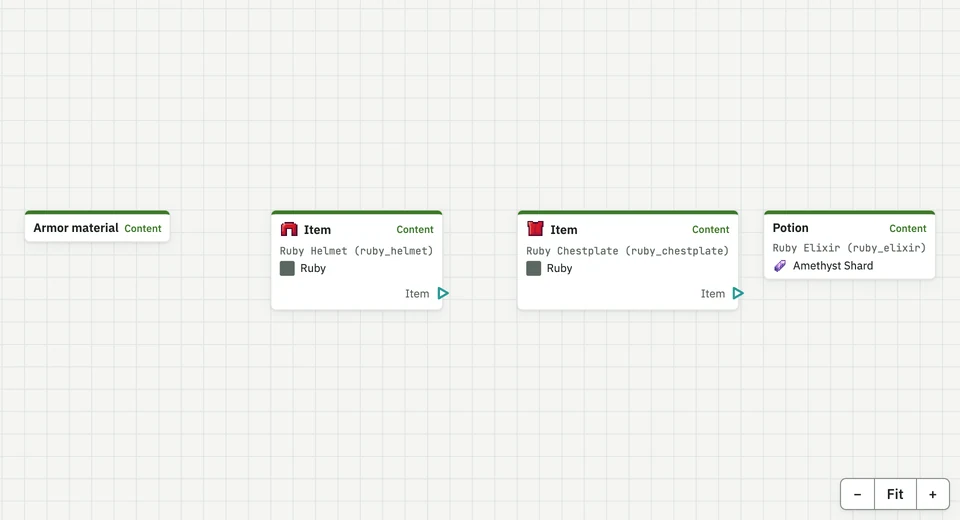
Putting the armor on displays your worn texture in 3D and grants diamond-tier protection, while brewing Awkward potions yields stackable combat elixirs.
Example 3: Portable Miner's Pouch with inventory storage
When you want a backpack or explorer bundle without writing container screen code, enable Storage on a Basic Item node.
- Item node (miners_pouch): Type set to Basic, Storage enabled, and Storage rows set to 3 (27 inventory slots).
- Creative tab node: Adds miners_pouch to Tools and Utilities so players can test it immediately.
- Shaped recipe node: Surrounds a Chest with Leather and Iron Ingots to craft the pouch in Survival.
Right-clicking the pouch opens a 3-row container GUI whose contents save with the item stack inside the player's inventory.
Java Edition vs Bedrock add-ons for items
| Capability | Java Edition (NeoForge & Fabric) | Bedrock Edition (.mcaddon) |
|---|---|---|
| Tools, armor, and durability | Full NeoForge and Fabric item classes, tool tiers, armor materials, and wearable textures. | Behavior pack item components and resource pack attachables inside an .mcaddon. |
| Right-click abilities | When item is used and When item is used on a block events with built-in cooldown animations. | Compiled to @minecraft/server Script API itemUse listeners. |
| Storage items and potions | Portable container GUIs and custom brewing stand recipes supported. | Focused on standard items, tools, armor, and food; Problems pane flags Java-only fields. |
Frequently asked questions
How do I draw or import custom item textures?
Open the Textures tab to pick from built-in pixel templates and CC0 starter packs, paint directly in the 16x16 editor, upload your own square PNG files, or ask the AI chat to generate matching pixel art for new items.
Can one Tool material or Armor material power multiple items?
Yes. Create one Tool material or Armor material node and reference it from your sword, pickaxe, axe, shovel, hoe, or four armor pieces so changing durability or mining speed updates the whole set at once.
How do I make a custom item edible or drinkable with effects?
Enable the Food checkbox on an Item node. You can set Nutrition, Saturation, Eat time in seconds, toggle Drink for bottle sound and animation, choose a Leftover item like a bowl, and list up to 8 timed potion effects.
Why does the Problems pane remind me to add items to a Creative tab?
Items not listed in any Creative tab can only be obtained with /give or crafting recipes. Adding a Creative tab node (either a custom mod tab or a vanilla tab like Tools and Utilities) puts them in the Creative inventory.
Related docs and guides
- Docs: Right-clicksTrigger abilities and cooldowns when a player uses an item.
- Docs: Events and flowWire item actions, conditions, and variables together.
- Guide: How to Make a Minecraft ModCompare Java IDEs, desktop mod makers, and browser node graphs.
- Guide: Designing Custom Minecraft WeaponsPair custom items with cooldowns, hit triggers, and area effects.
More mod maker features
- Blocks, ores & cropsCreate custom Minecraft blocks, underground ores, block families, crops, and light-emitting decor visually in your browser.
- Custom mobsDesign custom Minecraft mobs, hostile bosses, tameable companions, AI behaviors, loot drops, and biome spawns without coding.
- Weapons & combatBuild custom Minecraft weapons, elemental swords, teleport wands, bows, custom enchantments, and 3x3 hammers on a visual node graph.
- Recipes & lootBuild Minecraft shaped and shapeless crafting recipes, blast furnace smelting, smithing upgrades, villager trades, and loot tables visually.