Minecraft mob maker
Configure custom mobs with vanilla body models, custom skins, AI goal lists, biome spawns, loot drops, and combat event wires.
- Java Edition 1.20.1 to 26.3
- NeoForge
- Fabric
- Bedrock add-ons
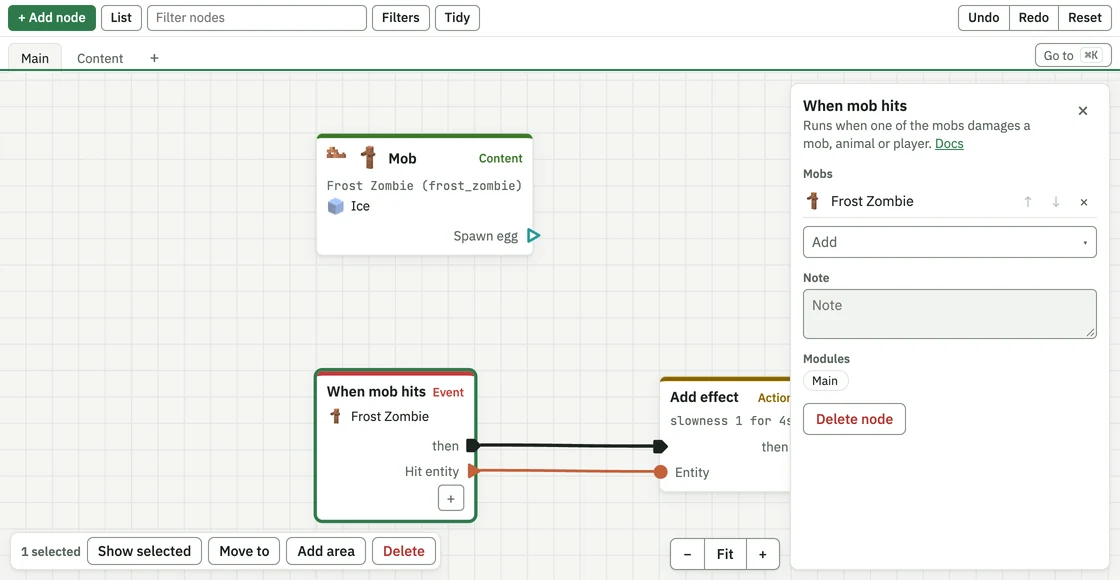
Live graph: A Frost Zombie that spawns in snowy biomes and applies Slowness whenever it hits a player.
What you can configure

13 vanilla body models and skins
Choose Pig, Cow, Chicken, Zombie, Skeleton, Creeper, Spider, Wolf, Cat, Bat, Fox, Polar Bear, or Enderman layouts with live 3D skin previews.

Movement, combat, and taming
Pick walking, flying, or wall-climbing movement, melee, arrow, or explode attacks, daylight burning, tame items, tempting items, and rideable mounts.

Ordered AI goals and spawns
Arrange AI goals (Panic, Tempt, AvoidPlayers, Wander, LookAtPlayers, LookAround) and set per-biome spawn weights and group sizes.

Spawn eggs, drops, and hit hooks
Customize spawn egg colors, Looting-scaled drop tables, and wire When mob hits or When mob spawns to custom status effects.
Inside the Mob inspector
The Mob node bundles entity stats, model body selection, AI behavior goals, spawn egg colors, loot tables, and biome spawn rules in one card. A 3D preview updates as you switch Body layouts or paint a skin in the Textures tab, while conditional fields adapt when you toggle Attacks players or Tameable.
Pick from 13 vanilla model layers (Pig, Cow, Chicken, Zombie, Skeleton, Creeper, Spider, Wolf, Cat, Bat, Fox, Polar Bear, Enderman) and choose Walks, Flies, or Climbs.
Toggle Attacks players to select Melee, Arrows, or Explode attacks and Attack damage, or leave passive to unlock Tameable, Tamed with items, and Rideable mounts.
Order goals from highest priority down: Panic, Tempt, AvoidPlayers, Wander, LookAtPlayers, and LookAround.
Add up to 8 biome spawn rules (biomes or tags, spawn weight, group min/max) and up to 8 loot drops scaled by Looting enchantment level.
Example builds you can make
Example 1: Frost Zombie with slowing melee attacks
Build a biome-themed undead enemy that resists daylight, patrols snowy biomes, drops ice, and inflicts Slowness whenever it lands a hit on a player.
- Mob node (frost_zombie): Body Zombie, Health 24, Attacks players enabled (Melee, Attack damage 4.0), Burns in daylight disabled, Spawns in snowy_plains and snowy_taiga (Weight 12, Group 1 to 3), Drops 1 to 2 Ice.
- When mob hits event node: Targets set to frost_zombie.
- Add effect action node: Applies Slowness level 1 for 4 seconds, wired from When mob hits's Hit entity output.
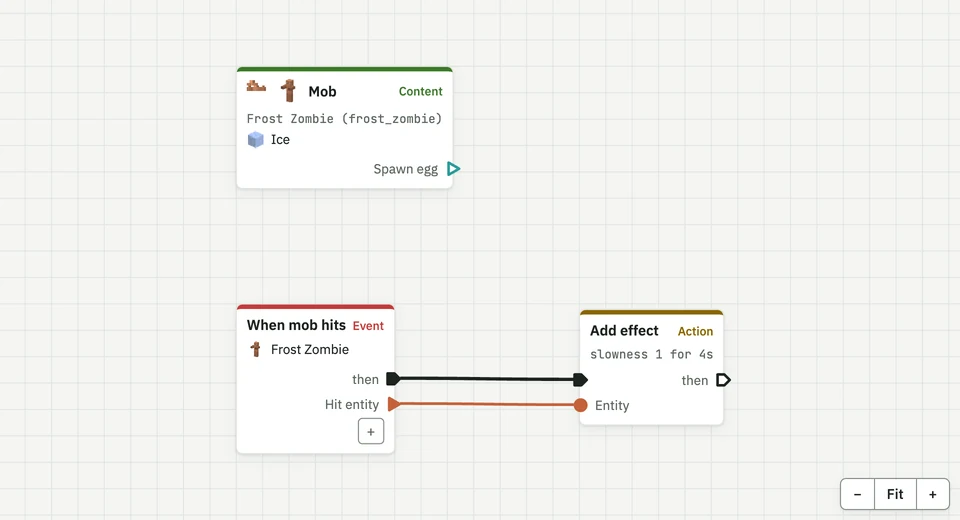
Frost Zombies spawn across snowy plains and taiga at night without burning at dawn, slowing players they strike in combat.
Example 2: Tameable Ruby Wolf that heals when petted
Passive mobs can be tamed with custom or vanilla items, tempted by food, and wired to When player right-clicks an entity for interactive care.
- Mob node (ruby_wolf): Body Wolf, Health 20, Attacks players disabled, Tameable enabled, Tamed with Bone, Tempted by Cooked Beef, Goals ordered Tempt, Wander, LookAtPlayers, LookAround.
- When player right-clicks an entity event node: Targets set to ruby_wolf.
- Heal action node: Restores 6.0 health to the clicked wolf entity.
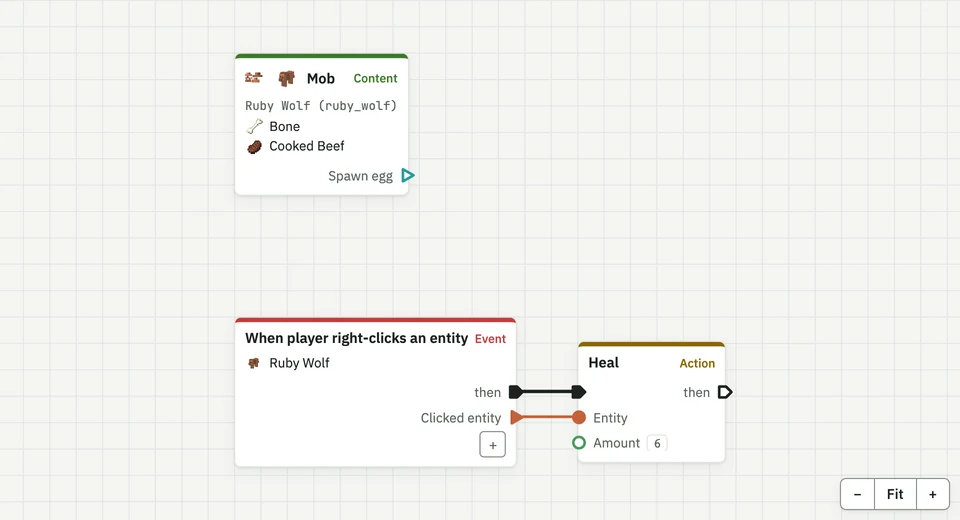
Players lure the Ruby Wolf with cooked beef, tame it with bones, and right-click it between fights to restore health.
Example 3: Flying Shadow Wraith mini-boss
Combine Bat or Enderman models with flying movement, ranged arrow attacks, and death rewards for a custom dungeon encounter.
- Mob node (shadow_wraith): Body Enderman, Health 60, Moves Flies, Attacks players enabled with Attack set to Arrows.
- When mob hits + Launch action: Knocks hit players upward slightly on ranged strikes.
- When entity dies event node: Targets shadow_wraith, plays Enderman teleport sound, and drops rare loot.
The Shadow Wraith hovers through caves firing ranged attacks and rewards players with rare drops and sound feedback when defeated.
Java Edition vs Bedrock add-ons for mobs
| Capability | Java Edition (NeoForge & Fabric) | Bedrock Edition (.mcaddon) |
|---|---|---|
| Entity registration and models | Generates NeoForge or Fabric entity classes, renderers, model layers, and spawn egg items. | Generates Bedrock entity behavior and resource definitions with client geometry. |
| Biome spawns and drops | Biome modifiers and entity loot table JSON files. | Spawn rules JSON and Bedrock loot tables inside the .mcaddon. |
| Mob combat events | Event listeners for When mob hits, When mob spawns, and When entity dies. | Script API entityHurt and entitySpawn handlers. |
Frequently asked questions
How do I create custom skins for a mob?
Open the Textures tab and select your Mob node. The skin editor shows the exact UV layout matching your chosen Body model (such as 64x64 for Zombie or 64x32 for Chicken) alongside a live rotating 3D preview.
Can a custom mob be ridden by players?
Yes. For passive, non-tameable mobs that walk or climb (such as Pig, Cow, or Spider bodies), enable Rideable in the Mob inspector so players can mount and steer them.
How do I avoid infinite spawn loops with When mob spawns?
Never wire When mob spawns directly into Spawn mob for the same mob type, or every newly spawned mob triggers another spawn indefinitely. The Problems pane flags MM508 automatically if a spawn loop is detected.
Can I add custom loot to vanilla mobs like Zombies or Creepers?
Yes. Use a Vanilla loot node with Loot of set to Mobs, pick the vanilla entities you want to modify, and add your mod's items or vanilla items to their drop table.
Related docs and guides
- Docs: Hits and damageModify damage, apply effects, and react to mob kills.
- Docs: PerformanceKeep mob tick loops and nearby entity checks fast.
- Guide: Why an AI Mod Maker Works Better as a GraphSee how AI creates and adjusts mobs like the Frost Zombie on the canvas.
- Guide: NeoForge vs Fabric vs Bedrock Add-OnsPick the right target for your custom entities and spawns.
More mod maker features
- Items, tools & armorCreate custom Minecraft items, pickaxes, armor sets, storage pouches, and enchanted food in your browser with visual nodes and AI.
- Blocks, ores & cropsCreate custom Minecraft blocks, underground ores, block families, crops, and light-emitting decor visually in your browser.
- Weapons & combatBuild custom Minecraft weapons, elemental swords, teleport wands, bows, custom enchantments, and 3x3 hammers on a visual node graph.
- Recipes & lootBuild Minecraft shaped and shapeless crafting recipes, blast furnace smelting, smithing upgrades, villager trades, and loot tables visually.